
IDM integration into Safari does not work. What should I do?
Download panel for video is not shown or shown in some wrong place. What should I do?
Please make sure that you have installed the latest version of IDM.
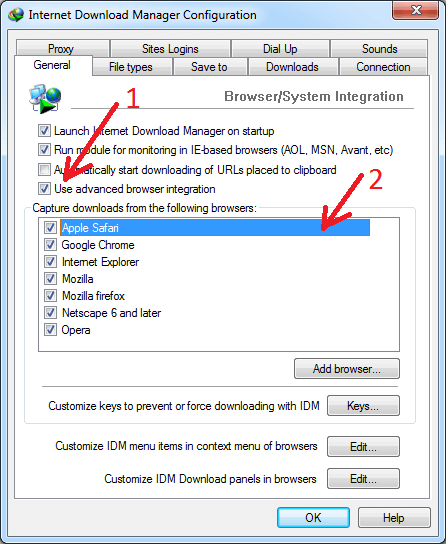
1. For Safari you have to enable "Use advanced browser integration" option in "Options→General" IDM dialog (arrow 1 on the image). Then check that integration into Safari is also enabled (arrow 2 on the image).
3. Also integration may not work when browser is launched in Admin mode. This can happen not only if you do this intentionally but when you launch Safari from some intermediary program like Total Commander that is launched in Admin mode or if you use some portable version with custom launcher.
4. If it still does not work, maybe you try to download a HTTPS link. Please note that IDM does not support HTTPS links for Safari browser. We plan to add such support in the future.